
Yu Chunbo1,Li Ying2 (1. Beijing Xuanyan Law Firm, Beijing 100089; 2. Beijing Liuchen Law Firm, Beijing 100080)
The Chinese version was first published on China Invention & Patent (Journal of Intellectual Property Information Science) ,Volume 20, Issue 3,March 2023
Machine Translated by Google
Abstract: United States Patent and Trademark Office (USPTO) A new tool designed to facilitate free public access to US patent searches, called the Patent Public Search tool (PPUBS) , officially launched on September 30, 2022. This paper employs a comparative research method, selecting Espacenet and the China National Intellectual Property Administration’s (CNIPA) search tool, both offering free public search services, as comparison objects, to study the scope of search results and main functions of the new tool. This provides a reference for intelligence researchers to conduct more comprehensive, accurate, and efficient searches for US patent information.
Keywords: US patents, search tools, databases, PPUBS
On September 30, 2022, the United States Patent and Trademark Office ( USPTO ) The free, cloud-based Patent Public Search tool ( PPUBS ) is now officially operational at https://ppubs.uspto.gov/pubwebapp/ . This replaces the four existing patent search tools of the USPTO : Public Examiner Automated Search Tool (PubEAST), Public Web Examiner Search Tool (PubWEST), Patent Full Text and Image Database (PatFT), and Patent Application Full Text and Image Database (AppFT). The USPTO announced that these four search tools will be retired . [1]
PPUBS is free to all Internet users worldwide and offers more convenient, remote and powerful search capabilities than in the past. Drew Hirshfeld, former U.S. Under Secretary of Commerce for Intellectual Property and Director of the Patent and Trademark Office, believes that ” previous public search tools did not provide users with the same convenience or similar functionality as the tools used by examiners . Now, more stakeholders can use more powerful resources to search for patents in an extended tool (i.e., the new public patent search tool) ” [2] .
Currently, the new public patent search tool integrates three databases : US-PGPUB, USPAT, and USOCR . US-PGPUB is a database of patents published before their grant in the United States. USPAT is a database of full-text US patents. USOCR is a database of early US patents, primarily including those published in the 19th and 20th centuries. Because electronic copies of these patent texts were not available at the time, OCR technology was used for text recognition to support full-text search. Users can select one or more of these three databases for searching. These three databases only include US patents ; therefore, the research on other databases in the following comparative analysis is limited to the search and analysis of US patents.
1 Comparative Study of Search Results
Although the officially published coverage of various search tools is roughly the same, the results returned by each tool in actual searches can differ. The following study compares the scope of results returned by PPUBS searches using Espacenet, a free patent search tool from the European Patent Office (hereinafter referred to as Espacenet), and the free patent search and analysis tool from the China National Intellectual Property Administration (hereinafter referred to as the CIPO search tool) .
1.1 Macro-level comparison of the scope of search results
Within the IPC classification system, subclass A21B , group C01B17 , and subgroup F23D1/02 were randomly selected , and searches were conducted simultaneously in three official free databases. The maximum number of files retrieved is shown in Table 1.
Table 1 Number of sampling search results by category number
Database/Classification Number | A21B Result Count | C01B17 Result Count | F23D1/02 Result Count |
PPUBS | 8 321 | 9773 | 165 |
Espacenet | 7616 | 8829 | 241 |
State Intellectual Property Office Search Tool | 6365 | 7144 | 177 |
By comparing and analyzing the data in Table 1, and combining this with experience in retrieving other IPC classification numbers, it was found that when the results contain a large amount of data, in most cases the order of result count from most to least is PPUBS , Espacenet , and the State Intellectual Property Office (SIPO) search tool. However, this pattern is not absolute. In some cases, such as group F23D1/02 in Table 1 , the order of result count from most to least is Espacenet , the SIPO search tool, and PPUBS . The reasons for the differences in result counts will be analyzed in detail below. The comparison of classification number search result counts is shown in Figure 1.
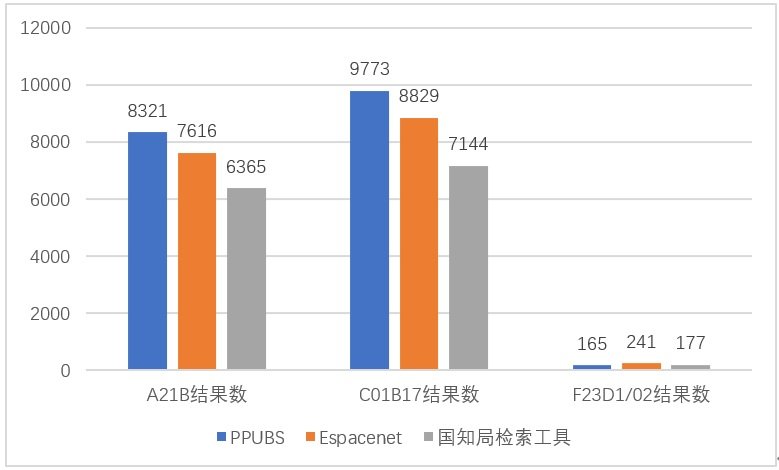
Figure 1 Comparison of the number of sample search results by category number
We randomly selected titles containing the keyword ” capacitance ,” abstracts containing the keywords “fluidized” and “cyclone,” and descriptions containing the keyword “sapphire ,” and simultaneously searched three official free databases. The maximum number of documents retrieved is shown in Table 2.
Table 2. Number of Keyword Sampling Search Results
Database/Keywords | “ capacitance ” results | “fl uidized ” and “ cyclone ” | “ sapphire ” |
PPUBS | 10223 | 3 62 | 2 3079 |
Espacenet | 9 947 | 3 16 | 2 3061 |
State Intellectual Property Office Search Tool | 8343 | 367 | 2 0852 |
in Table 2 reveals that, similar to the classification number search, when the results contain a large amount of data, the order of result count from highest to lowest is usually PPUBS , Espacenet , and the State Intellectual Property Office (SIPO) search tool. Similarly, in some cases, such as with the keywords ” fluidized” and “cyclone” in Table 2 , the order of result count from highest to lowest is SIPO search tool, PPUBS , and Espacenet . The reasons for these differences in result count will be analyzed in detail below. A comparison of keyword search result counts is shown in Figure 2 .
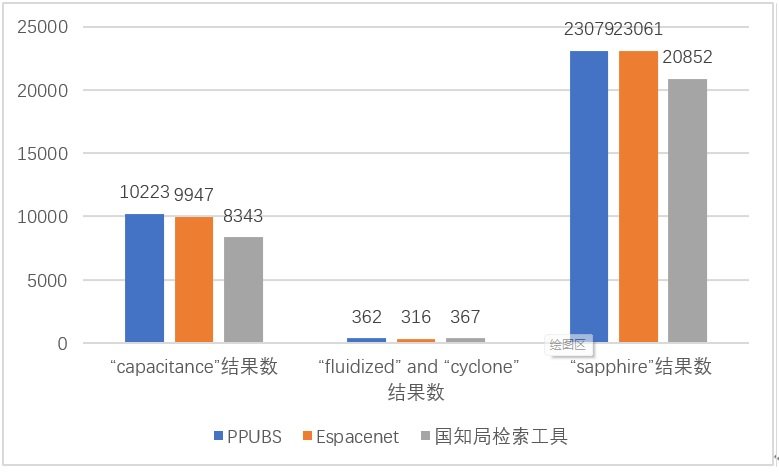
Figure 2 Comparison of keyword sampling search results
1.2 Analyze the reasons for the differences based on the classification number search results .
We selected IPC classification group ” F23D1/02 ” and conducted a sampling study on patent documents published in different years. Search results were compared across five time ranges: publication dates prior to 2022 , 2020 , 2000 , 1980 , and 1930. The amount of data retrieved using the three search tools is shown in Table 3 .
Table 3 Comparison of the number of search results for PC classification number F23D1/02 from different eras
Database/Year | 2022 ( January -October ) | 2020 | 2,000 | 1980 | Before 1930 |
PPUBS | 5 | 5 | 3 | 1 | 2 |
Espacenet | 3 | 1 | 9 | 2 | 1 |
State Intellectual Property Office Search Tool | 2 | 5 | 3 | 2 | 1 |
In all the comparison tables below, the publication number represents the publication number of the retrieved text. If there is no publication number in the box, it means that no results were returned by other search tools in the same row, and the reasons for the difference are analyzed in the text box.
from January to October 2022 are compared in Table 4 .
Table 4. Comparison of the number of search results for IPC classification number F23D1/02 published from January to October 2022 .
Serial Number | Analysis of Publication Numbers or Reasons for Differences in PPUBS Search Results | Analysis of Public Numbers or Reasons for Discrepancies in Espacenet Search Results | Analysis of discrepancies in search results from the State Intellectual Property Office’s search tools. |
1 | US20220163198A1 | US2022163198A1 | US2022163198A1 |
2 | US11421871B2 | US11421871B2 | US11421871B2 automatically removes duplicates when displaying the number of results. You can select the text of US11421871B2 after opening US2022163198A1. |
3 | US20220003408A1 | US2022003408A1 | Unable to be tracked, suspected to be not included in the database. |
4 | US11306915B2 | It is included in the database, the classification number is correct, and the publication date was not identified as 2022 , but rather as the earliest publication year of the patent. | US11306915B2 |
5 | US11359808B2 | It is included in the database, the classification number is correct, and the publication date was not identified as 2022 , but rather as the earliest publication year of the patent. | Unable to be tracked, suspected to be not included in the database. |
The comparison results of IPC classification numbers F23D1/02 and publication dates in 2020 are shown in Table 5.
Table 5. Comparison of the number of search results for IPC classification number F23D1/02 published in 2020 .
Serial Number | of PPUBS Search Results and Reasons | Analysis of Espacenet search results publication numbers and reasons | Analysis of the Publication Numbers and Reasons for Search Results from the State Intellectual Property Office’s Search Tool |
1 | US20200292167A1 | US20200292167A1 | US20200292167A1 |
2 | US10775042B2 | It is included in the database, the classification number is correct, and the publication date was not identified as 2020 , but rather as the earliest publication year of the patent. | US10775042B2 |
3 | US10731850B2 | It is included in the database, the classification number is correct, and the publication date was not identified as 2020 , but rather as the earliest publication year of the patent. | US10731850B2 |
4 | US10655842B2 | It is included in the database, the classification number is correct, and the publication date was not identified as 2020 , but rather as the earliest publication year of the patent. | US10655842B2 |
5 | US10634341B2 | It is included in the database, the classification number is correct, and the publication date was not identified as 2020 , but rather as the earliest publication year of the patent. | US10634341B2 |
The comparison results for IPC classification number F23D1/02 and publication date in 2000 are shown in Table 6.
Table 6. Comparison of the number of search results for IPC classification number F23D1/02 published in 2000 .
Serial Number | of PPUBS Search Results and Reasons | Analysis of Espacenet search results publication numbers and reasons | Analysis of the Publication Numbers and Reasons for Search Results from the State Intellectual Property Office’s Search Tool |
1 | US6148744A | US6148744A | US6148744A |
2 | US6145449A | US6145449A | Unable to be tracked, suspected to be not included in the database. |
3 | US6116171A | US6116171A | Unable to be tracked, suspected to be not included in the database. |
4 | Yes, it is indexed. Checking the bibliographic entries, the IPC classification number has been updated to the 2006 version. The full-text images show the IPC classification numbers as F23C1/12 and F23D1/02 , while the bibliographic entries show the IPC classification number as: F23D1/00 | US6112676A | US6112676A |
5 | Yes, it is indexed. Checking the bibliographic entries, the IPC classification number has been updated to the 2006 version. The full-text images show the IPC classification numbers as: F23B7/00 and F23D1/02 . The bibliographic entries show the IPC classification number as: F23C6/00 , F23C3/00 , F23C6/04 , F23D1/00 | US6152054A | Yes, it is indexed. A search of the bibliographic entries shows that the IPC classification numbers have been updated to the 2022 version. The full-text images display IPC classification numbers as F23B7/00 and F23D1/02 , while the bibliographic entries display IPC classification numbers as F23C3/00 , F23C6/04 , and F23D1/00. |
6 | Yes, it is indexed. A search of the bibliographic entries shows that the IPC classification numbers have been updated to the 2006 version. The full-text images display IPC classification numbers as: F23D1/02 and F23B37/00, while the bibliographic entries display IPC classification numbers as: F22B37/00 and F23C3/00 . F22B37/14 | US6021724A | Yes, it is indexed. Checking the bibliographic entries, the IPC classification numbers have been updated to the 2022 version. The full-text images show the IPC classification numbers as: F23D1/02 and F23B37/00. The bibliographic entries show the IPC classification numbers as: F23C3/00 , F22B37/14 |
7 | Yes, it is indexed. A search of the bibliographic entries shows that the IPC classification number has been updated to the 2006 version. The full-text images display the IPC classification number as F23D1/00, while the bibliographic entries display the IPC classification numbers as F23C9/00 and F23C5/00. F23M5/08, F23C7/06, F23M5/00, F23C3/00, F23C7/00 , F23C9/08 | US6148745A | US6148745A |
8 | Yes, it is indexed. A search of the bibliographic entries shows that the IPC classification numbers have been updated to the 2006 version . The full-text images display the IPC classification numbers as: F23C5/32, F23M3/00, F23D1/02, while the bibliographic entries display the IPC classification numbers as: F23G7/06 , F26B23/00 . F26B11/00 , F23C3/00, F26B23/02, F26B11/02, F23C9/00 | US6079974A | Yes, it is indexed. Checking the bibliographic entries, the IPC classification number has been updated to the 2022 version. The full-text images show the IPC classification numbers as F23D1/02 and F23D15/02 , while the bibliographic entries show the IPC classification number as: F23C3/00 , F26B23/02 , F26B11/02 , F23C9/00 , F23G7/06 |
9 | Yes, it is indexed. A search of the bibliographic entries shows that the IPC classification numbers have been updated to the 2006 version . The full-text images display the IPC classification numbers as: F23C5/32, F23M3/00, F23D1/02, while the bibliographic entries display the IPC classification numbers as: F23D11/10, C10J3/50, F23D1/00 , C10J 3/48. | US6010330A Upon further examination of the bibliographic entries, it was found that the IPC classification number has also been updated, now displaying as: “ C10J3/50; F23D1/00; F23D11/10; (IPC1-7): C10J3/48; F23D1/02; F23D15/02; ” indicate that the European Patent Office (EPO) updated the bibliographic data according to the 2022 IPC classification , while retaining the old ( IPC1-7 ) classification . | Yes, it is indexed. A search of the bibliographic entries shows that the IPC classification numbers have been updated to the 2022 version. The full-text images display the IPC classification numbers as: F23C5/32, F23M3/00, F23D1/02, while the bibliographic entries display the IPC classification numbers as: F23D11/10 , C10J3/50 , F23D1/00. |
The comparison results for IPC classification number F23D1/02 and publication date in 1980 are shown in Table 7.
Table 7. Comparison of the number of search results for IPC classification number F23D1/02 published in 1980.
Serial Number | of PPUBS Search Results and Reasons | Analysis of Espacenet search results publication numbers and reasons | Analysis of the Publication Numbers and Reasons for Search Results from the State Intellectual Property Office’s Search Tool |
1 | US4223615A | US4223615A | US4223615A |
2 | Yes, it is indexed. Checking the bibliographic entries, the IPC classification number has been updated to the 2006 version. The full-text images display the IPC classification number as C22B1/10, while the bibliographic entries display the IPC classification number as: H02K44/08 , F23C3/ 00 F23C7/02 , C22B5/ 14 H02K44/00 , C21B7/ 00 F23C7/00 , C22B5/ 00 C21B7/16 | US4217132A | US4217132A |
Table 8 shows the comparison results of IPC classification numbers F23D1/02 and publication dates prior to 1930 .
Table 8. Comparison of the number of search results for IPC classification number F23D1/02 published before 1930 .
Serial Number | of PPUBS Search Results and Reasons | Analysis of Espacenet search results publication numbers and reasons | Analysis of the Publication Numbers and Reasons for Search Results from the State Intellectual Property Office’s Search Tool |
1 | US1471681A | US1471681A | US1471681A |
2 | US1471681A , USPAT and USOCR each retrieved one result, which is displayed repeatedly . |
Analyzing the comparison results in Table 3-8 reveals the following patterns:
- PPUBS and Espacenet have roughly the same scope of coverage; the State Intellectual Property Office’s search tool did not detect or track a few samples, which may be due to non-coverage.
- IPC classification results is that the three search tools use different default IPC classification number versions . Specifically, when collecting data, PPUBS supports the 2006 version of the IPC classification number by default, Espacenet supports the latest version ( 2022 version) of the IPC classification number by default and also supports IPC ( 1-7 ) versions, while the State Intellectual Property Office (SIPO) search tool supports the latest version (2022 version ) of the IPC classification number by default.
- Espacenet’s default publication time is the publication time of the earliest published text of a patent, while PPUBS and the State Intellectual Property Office’s search tool default to the publication time of each published version.
- PPUBS does not perform deduplication; it only collapses duplicate results in the result display. In contrast, Espacenet and the State Intellectual Property Office’s search tool directly display the results after deduplication according to different rules.
- Analyze the reasons for the differences based on keyword search results.
” fluidized and cyclone” (where “and” is a Boolean operator) were selected for searching within the scope of patent document abstracts. A comparative sampling study was conducted on patent documents published in different years . In addition to the publication dates of 2022, 2020, 2000, 1980, and before 1930 selected in Table 3 , patent documents published in 1974 were also included for comparison to obtain more comprehensive results.
total amount of data for the search results is shown in Table 9 , which retrieves patents from different eras using keywords .
Table 9 Comparison of keyword search results across different eras
Database/Year | 2022 ( January -October ) | 2020 | 2,000 | 1980 | 1974 | Before 1930 |
PPUBS | 3 | 7 | 1 0 | 4 | 4 | 0 |
Espacenet | 1 | 9 | 9 | 2 | 3 | 0 |
State Intellectual Property Office Search Tool | 2 | 5 | 9 | 2 | 8 | 0 |
To track the reasons for the differences in keyword search results, the search results in the table above were analyzed year by year. The comparison of the keyword search results published from January to October 2022 is shown in Table 10 .
Table 10 Comparison of the number of publicly available keyword search results from January to October 2022
Serial Number | of PPUBS Search Results and Reasons | Analysis of Espacenet search results publication numbers and reasons | Analysis of the Publication Numbers and Reasons for Search Results from the State Intellectual Property Office’s Search Tool |
1 | US20220275287A1 | US2022275287A1 | US2022275287A1 |
2 | US11352284B2 | It is included in the database, the keywords are correct, the publication date was not identified as 2022, but was identified as the earliest publication year of the patent. | US11352284B2 |
3 | US11220558B2 | “cyclone” (in the abstract it is “cyclone s”) cannot be identified . The publication date was not identified as 2022, but it was identified as the earliest publication year of the patent. | “cyclone” cannot be identified (it appears as “cyclone s” in the abstract ). The publication date can be identified as 2022 . |
11 shows a comparison of the keyword search results published in 2020 .
Table 11 Comparison of the number of publicly available keyword search results in 2020
Serial Number | of PPUBS Search Results and Reasons | Analysis of Espacenet search results publication numbers and reasons | Analysis of the Publication Numbers and Reasons for Search Results from the State Intellectual Property Office’s Search Tool |
1 | US20200262729A1 | US20200262729A1 | US2020262729A1 |
2 | US20200247702A1 | US20200247702A1 | US20200247702A1 |
3 | US20200207653A1 | US20200207653A1 | US20200207653A1 |
4 | US20200140331A1 | US20200140331A1 | US20200140331A1 |
5 | US20200123279A1 | “cyclone” cannot be identified (it appears as “cyclone s” in the abstract ). The publication date can be identified as 2020 . | “cyclone” cannot be identified (it appears as “cyclone s” in the abstract ). The publication date can be identified as 2020 . |
6 | US20200087251A1 | US20200087251A1 | No results were found through the public account. |
7 | US10569247B1 | US10569247B1 | US10569247B1 |
8 | Included, the authorized version corresponding to serial number 3, the publication date was not identified as 2020 . | US11352284B2 | US11352284B2 |
9 | Included, the authorized version corresponding to serial number 2 , the publication date was not identified as 2020 . | US11084748B2 | US11084748B2 |
1 0 | Included, the authorized version corresponding to serial number 6 , the publication date was not identified as 2020 . | US10894762B2 | Unable to be tracked, suspected to be not included in the database. |
12 shows a comparison of the keyword search results published in 2000 .
Table 12 Comparison of the number of publicly available keyword search results in 2000
Serial Number | of PPUBS Search Results and Reasons | Analysis of Espacenet search results publication numbers and reasons | Analysis of the Publication Numbers and Reasons for Search Results from the State Intellectual Property Office’s Search Tool |
1 | US6166282A | US6166282A | US6166282A |
2 | US6136065A | US6136065A | US6136065A |
3 | US6110413A | US6110413A | US6110413A |
4 | US6110356A | “cyclone” cannot be identified (it appears as “cyclone s” in the abstract ). The publication date can be identified as 2000 . | “cyclone” cannot be identified (it appears as “cyclone s” in the abstract ). The publication date can be identified as 2000 . |
5 | US6098553A | US6098553A | US6098553A |
6 | US6067943A | US6067943A | US6067943A |
7 | US6045688A | US6045688A | US6045688A |
8 | US6042892A | US6042892A | US6042892A |
9 | US6039008A | US6039008A | US6039008A |
1 0 | US6022390A | US6022390A | US6022390A |
13 shows a comparison of the keyword search results published in 1980 .
Table 13 Comparison of the number of keyword search results published in 1980
Serial Number | of PPUBS Search Results and Reasons | Analysis of Espacenet search results publication numbers and reasons | Analysis of the Publication Numbers and Reasons for Search Results from the State Intellectual Property Office’s Search Tool |
1 | US4238237A | It is indexed, but the keyword “cyclone” cannot be identified (it is “cyclone s” in the abstract ). The publication date can be identified as 1980 . | It is indexed, but the keyword “cyclone” cannot be identified (it is “cyclone s” in the abstract ). The publication date can be identified as 1980 . |
2 | US4220623A | US4220623A | US4220623A |
3 | US4200438A | US4200438A | US4200438A |
4 | US4194965A | It is indexed, but the keyword “cyclone” cannot be identified (it is “cyclone s” in the abstract ). The publication date can be identified as 1980 . | It is indexed, but the keyword “cyclone” cannot be identified (it is “cyclone s” in the abstract ). The publication date can be identified as 1980 . |
14 shows a comparison of the keyword search results published in 1974 .
Table 14 Comparison of the number of keyword search results published in 1974
Serial Number | of PPUBS Search Results and Reasons | Analysis of Espacenet search results publication numbers and reasons | Analysis of the Publication Numbers and Reasons for Search Results from the State Intellectual Property Office’s Search Tool |
1 | US3851405A | US3851405A | US3851405A |
2 | US3840353A | It is included in the database, but the system could not find an abstract. The publication date can be identified as 1974 . | It is included in the database, but the system could not find an abstract. The publication date can be identified as 1974 . |
3 | US3834326A | US3834326A | US3834326A |
4 | US3790334A | US3790334A | US3790334A |
5 | It is included in the database, but the system could not find an abstract. The publication date can be identified as 1974 . | It is included in the database, but the system could not find an abstract. The publication date can be identified as 1974 . | US3848016A , the summary recognition field does not match the original text, and a segment in the embodiment was identified. |
6 | It is included in the database, but the system could not find an abstract. The publication date can be identified as 1974 . | It is included in the database, but the system could not find an abstract. The publication date can be identified as 1974 . | US3785962A , the summary recognition field does not match the original text, and a segment in the embodiment was identified. |
7 | It is included in the database, but the system could not find an abstract. The publication date can be identified as 1974 . | It is included in the database, but the system could not find an abstract. The publication date can be identified as 1974 . | US3825477A , the summary recognition field does not match the original text, and a section in the embodiment was identified. |
8 | It is included in the database; the abstract text does not contain ” cyclone ,” and the publication date can be identified as 1974 . | It is included in the database, but the system could not find an abstract. The publication date can be identified as 1974 . | US3842978A , the summary recognition field does not match the original text, and a segment from the embodiment was identified. |
9 | It is included in the database, but the system could not find an abstract. The publication date can be identified as 1974 . | It is included in the database, but the system could not find an abstract. The publication date can be identified as 1974 . | US3836635A , the summary recognition field does not match the original text, and a section in the embodiment was identified. |
Analyzing the comparison results in Table 9-14 , the following patterns can be further identified:
- PPUBS expands the search results to include plural forms, while Espacenet and the State Intellectual Property Office’s search tools strictly adhere to the keywords.
- For some early patents, PPUBS and Espacenet do not identify abstracts, but the scope of non-identification is not entirely consistent. The State Intellectual Property Office’s search tool also does not identify abstracts, but in specific embodiments, a paragraph is selected as the abstract, which is different from the abstract recorded in the original text.
- Comparative Study of PPUBS Functions
- PPUBS User Interface and Tabs
Currently, PPUBS offers both quick search and advanced search capabilities. There are two search modes: search and search results. The quick search interface is shown in Figure 3 , which includes search (search) and search results (search). results, search history The advanced search interface includes tabs such as history, documents viewer , and help. Figure 4 shows the interface for advanced search. Advanced search includes all the tabs in quick search, as well as a hit entry tab. Terms, tagged documents , and notes viewer Tabs such as “viewer” are available. Search results , search history, document viewer , and hits are also included. Terms, tagged documents , and notes viewer In tabs such as viewer, there is a “find within ” input box, which allows you to find and highlight content of interest within the tab.
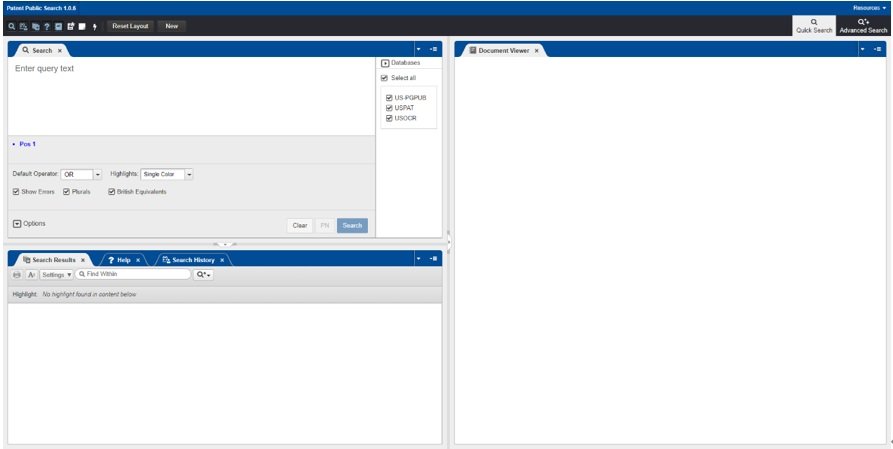
Figure 3 PPUBS quick search interface
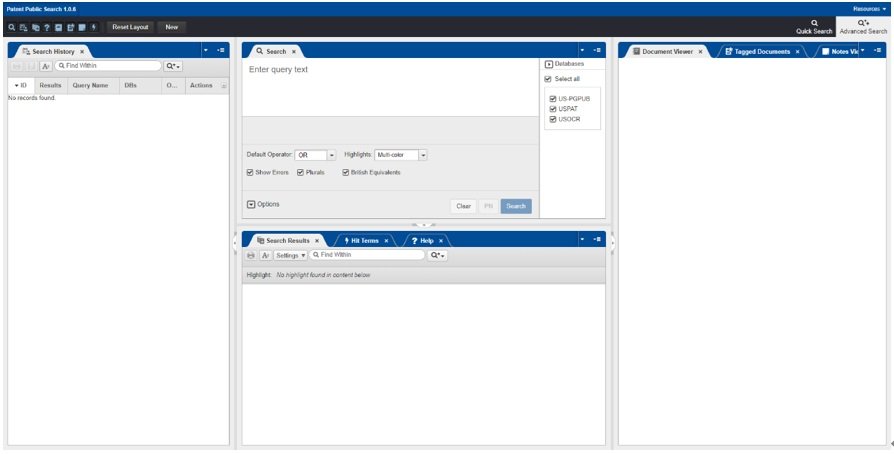
Figure 4 PPUBS Advanced Search Interface
Unlike the now-defunct US Patent and Trademark Office (USPTO) website’s authorized patent database search tool, PPUBS ‘s Quick Search and Advanced Search functions are largely the same across all tabs. The main difference lies in the additional features offered by the Advanced Search’s additional tabs. For general search needs, Quick Search is perfectly adequate. However, for in-depth and specialized searches, the additional features of Advanced Search become crucial.
PPUBS is a Boolean search tool. When performing a search, the user needs to mark “enter” in Figure 3. query Enter the search terms in the “text” input box, and then click the “search” button to perform the search. PPUBS can quickly search for patents by publication number, supporting direct input of the publication number and clicking the PN button to search. For example, entering ” 20220334160 ” and clicking the PN button will retrieve the patent document US 20220334160 A1 .
In terms of interface and input method, PPUBS is similar to the regular search functions in Espacenet and the State Intellectual Property Office (SIPO) search tools, but it also functionally supports the main command-line search functions of the SIPO search tools. Users can input search elements separated by spaces into the input box, just like in a regular search, and the tool automatically recognizes the attributes of the search elements, such as patent numbers, classification numbers , or keywords; or they can edit the search expression like a command-line search . For the advanced search interface, PPUBS differs from the advanced search functions in Espacenet and the SIPO search tools, which use a table-based search method.
For quick searches, PPUBS allows users to select a Boolean operator from a dropdown menu below the input box. Espacenet and the State Intellectual Property Office’s search tools use “AND” as the default Boolean operator; to select a different operator, you must enter it into the search input box. In the advanced search interface, the Hit Terms tab allows you to select highlighted content and adjust the highlight color.
2.2 Basic Syntax of PPUBS Search Statements
PPUBS , along with Espacenet and the State Intellectual Property Office’s search tools, are all Boolean search tools. Compared to semantic search tools developed by some paid search database providers, they require users to have a more professional grammatical foundation. Semantic search, also known as AI search , allows users to simply edit the technical solutions they want to search for into a specified language segment, and the system can automatically perform the search and sort them according to proximity. In contrast, the aforementioned Boolean search tools require strict adherence to the system’s prescribed syntax and the editing of search statements into a specific format.
PPUBS retains the basic syntax structure of existing Boolean search tools, roughly divided into three levels: statement, field, and feature. Fields within a statement are connected using Boolean operators, and features within a field can be connected using proximity or co-occurrence operators. Features can be expanded using wildcards. Therefore, PPUBS is more user-friendly for those with search experience. PPUBS returns search results quickly. According to PPUBS ‘s official documentation, although it can achieve most of the functionality of existing Boolean search tools, its underlying implementation logic is fundamentally different from existing search tools.
Compared to Espacenet and the State Intellectual Property Office’s search tools, PPUBS offers a much richer range of fields and more detailed categorization of similar content. For example, in addition to commonly used fields such as application number, publication number, title, abstract, claims, description, IPC classification number, applicant, and publication date, it also includes less common fields such as the Principal Examiner (XP) field, Assistant Examiner ( XA) field, and citations (URPN) field. Regarding classification numbers, besides the standard IPC and CPC classifications , it also includes CPCA , CPCI , and US Patent Classifications (CCLS and CLAS) .
For most fields, PPUBS syntax is: search element + “.” + suffix + “.”. For example, ” H04J2211/00.cpc. ” retrieves US patents with CPC classification number H04J2211/00 (Electrical Engineering – Telecommunications Technology – Multiplexed Communication – Orthogonal Indexing Schemes Involving Orthogonal Multiplexing Systems). ” sapphire.ab. ” retrieves US patents whose abstracts include ” sapphire .” Note that PPUBS does not support Chinese characters in its search input box and does not provide Chinese search functionality. ” tom. in . ” retrieves US patents whose inventors include Tom. Case is not important; entering “Tom” and “t om ” will yield the same search results.
The search for date ranges is slightly different and must begin with the “@” character. For example: ” @pd>”19991231″ ” means searching for US patents with a publication date later than December 31 , 1999 , excluding those published on December 31, 1999. ” @pd < = “19991231” ” means searching for US patents with a publication date earlier than December 31 , 1999 , including those published on December 31, 1999. ” @pd < > ” 19991231 ” ” means searching for US patents with a publication date not equal to December 31, 1999. ” @pd > = ” 1980 “<=”1986″ ” means searching for US patents with publication dates between 1980 and 1986 , including those published in 1980 and 1986 .
In the use of PPUBS , keyboard shortcuts can be used. It supports most common shortcuts, such as: Ctrl+A (select all), Ctrl+X (cut), Ctrl+C ( copy ), Ctrl+V (paste), UP (move up), DOWN (move down), RIGHT (move right), L EFT (move left), etc. Some shortcuts are special, such as: the number keys ” 1 ” and ” 7 ” are the next result and the previous result respectively when the cursor is in the search results. The symbol key ” * ” is used to mark documents in group 1 when the cursor is in the search results . The shortcut key ” CTRL+0-9 ” is used to move documents to group 1-10 when the cursor is in the search results . The shortcut key ” ALT+0-9 ” adds documents to group 1-10 when the cursor is in the search results [3] .
2.3 Operators and Wildcards
PPUBS are similar to those of Thomson innovation , the existing search tool with the closest symbol design , and are also different from those of Espacenet and the State Intellectual Property Office search tool [4] [5] .
2.3.1 Boolean Operators
In search queries, fields are connected using Boolean operators. The logic of Boolean operators applies to the entire document scope of the search target, not just specific paragraphs or sentences. Boolean operators in PPUBS include: AND , OR , NOT , and NOR . The AND operation means that both fields connected by “AND” must appear in the same document, regardless of their order. The OR operation means that adding “OR” indicates that at least one of the two or more fields connected by “OR” must appear in the document. The NOT operation means that the first field connected by “NOT” must appear in the document, while the second field must not. The XOR operation means that at least one of the two fields connected by “XOR” must appear in the document , but neither can appear simultaneously ; that is, the document includes exactly one of the two fields .
The Boolean operators used by Espacenet and the State Intellectual Property Office (SIPO) search tools include AND, OR , and NOT , with the same meanings as PPUBS . However, Espacenet and the SIPO search tools do not support the XOR operator.
2.2.2 Proximity Operator
The nearest neighbor operator connects search elements that are adjacent within a certain distance, either in an ordered or unordered manner. The nearest neighbor operator is very useful when emphasizing the accuracy of search results, i.e., requiring “precise search.” PPUBS also supports the nearest neighbor operator; the specific operators and their meanings are shown in Table 15 .
Table 15 Meaning of PPUBS’s nearest neighbor operator
Serial Number | Operator name | Operator meaning | Usage instructions and examples |
1 | ADJ | For an orderly proximity, the two elements must appear in quick succession, one after the other. | For example, “night adj train” can match ” NIGHT TRAIN “; ADJ is the default operator, and when no operator is given, the tool defaults to connecting the two elements as A and DJ. |
2 | ADJ[n] | The ordered proximity of at most n words means that the two elements must appear sequentially within the [n] words of the same sentence. | For example, “wet adj4 silicon” can match “wet oxidized, polysilazane-based silicon oxide” and ” wet-grinding a silicon “; the maximum value of n is 450 . |
3 | NEAR | In the case of disordered proximity, two elements must appear in quick succession, adjacent to each other. | For example, “night near train” can match both ” NIGHT TRAIN ” and ” TRAIN NIGHT “. |
4 | NEAR[n] | are unordered and adjacent to at most n words; the two elements must appear sequentially in the same sentence among the [n] words. | For example, “cyclotron near 7 magnetic” can match ” a magnetic sector mass analyzer, or an ion cyclotron “; the maximum value of n is 450 . |
to PPUBS , Espacenet also has the function of ordered and unordered proximity calculation. It can be edited in the basic (smart) search, or it can be done in the table drop-down box in the advanced search. The proximity range is within 1-10 words.
The PPUBS operators “ ADJ ”, “ ADJ[n] ”, “ NEAR ”, and “ NEAR[n] ” are equivalent to the “W”, “ [n] W”, “D”, and “ [n] D ” operators in the State Intellectual Property Office (SIPO) search tool . There are two main differences between the proximity operators of the two search tools: First, the maximum value of n in PPUBS is 450 , while the SIPO search tool theoretically does not specify a maximum value for n. Second, PPUBS cannot precisely specify the number of words separating two search elements, while the SIPO search tool can; for example, NIGHT = 2W TRAIN can only match “ NIGHT (two words) TRAIN ” .
2.2.3 co-occurrence operator
The co-occurrence operator refers to the operator connecting search elements that simultaneously exist within a certain range. The application scenarios for the co-occurrence operator are similar to those for the proximity operator, but it typically yields a larger range of results. Table 16 shows the co -occurrence operators and their meanings in PPUBS .
Table 16 Meaning of the co-occurrence operator in PPUBS
Serial Number | Operator name | Operator meaning | Usage instructions and examples |
1 | WITH | Same sentence , The retrieved records contain elements both before and after the operator, and these elements appear in the same sentence. | For example, the document ” ( NIGHT WITH TRAIN). DETD.” will only be considered a match if a sentence in the detailed description of the specification contains both the words “NIGHT” and “TRAIN”. |
2 | WITH[n] | Given n sentences , the retrieved records contain elements both before and after the operator, and these elements appear in the preceding and following n sentences. | For example, the document “( NIGHT WITH 3 TRAIN). DETD.” will only be considered a valid reference if the three consecutive sentences in the detailed description of the document contain both the words “NIGHT” and “TRAIN”. |
3 | SAME | the same paragraph , the retrieved records contain elements before and after the operator and appear in the same paragraph. | For example, “( NIGHT SAME TRAIN). DETD.”, this document will only be considered valid if a paragraph in the detailed description of the instruction manual contains both the words “NIGHT” and “TRAIN”. |
4 | SAME[n] | the same n paragraphs , the retrieved records contain elements before and after the operator and appear in the preceding and following n paragraphs (prargraphs). | For example, “( NIGHT SAME4 TRAIN). DETD.”, this document will only be considered valid if the words “NIGHT” and “TRAIN” are contained in four consecutive paragraphs within the detailed description of the instruction manual. |
to PPUBS , Espacenet also supports searching within the same sentence and paragraph, but it lacks other co-occurrence operators. PPUBS and the State Intellectual Property Office (SIPO) search tool have relatively more co-occurrence operators. PPUBS ‘s ” WITH ” and ” SAME ” operators are equivalent to the “S” and “P” operators in the SIPO search tool, respectively. There are three main differences in the co-occurrence operators between PPUBS and the SIPO search tool: First, PPUBS lacks the ” F ” function, meaning the operator connects elements within the same document (e.g., claims, description, abstract, etc.) , resulting in a search record containing both elements within the same document (field) . Second, PPUBS lacks the “NOTF , ” “NOTP , ” or “NOTS ” functions, meaning the operator connects elements outside the same document, paragraph, or sentence. Third, the SIPO search tool lacks the ” WITH[n] ” and ” SAME[n] ” functions, preventing searches within multiple adjacent paragraphs or sentences.
2.2.4 wildcard
In keyword retrieval, for a single word, the inventor may use a verb form, a noun form, or even the plural form, past tense, or past participle of the word. Therefore, English keywords need to be expanded. For example, the feature “thermal insulation” could be expressed as insulate, inulated, or insulation. To ensure comprehensiveness of the search, wildcards or truncation symbols should be used for keyword retrieval as needed .
The wildcards in PPUBS are equivalent to the truncation symbols in the State Intellectual Property Office’s search tools, and Espacenet also uses wildcards . The functions of wildcards in the three search tools are largely the same. The meanings of wildcards in PPUBS are shown in Table n, and the corresponding meanings in the State Intellectual Property Office’s search tools and Espacenet are shown in Table 17 .
Table 17. Meanings and Comparison of Wildcards/Truncation Symbols in Three Search Tools
Serial Number | PPUBS wildcards | Espacenet wildcards | State Intellectual Property Office Truncation Symbol | Operator meaning | Usage instructions and examples |
1 | ? | # | # | Matches any single character that can appear at the beginning, middle, or end of a word. | For example, the command “m? cro ” will highlight all documents whose text contains the words “micro” or “macro”. |
2 | $[#] | none | none | Match at most the given number of characters | For example, the keyword ” micro$3 ” contains words such as “microia”, “microbio”, “microsoftsec”, and “microgel”. |
3 | * or $ | * | + | Match any number of characters | For example: ” micro* ” or The term “ micro$ ” matches any of the first five letters , including “ microencapsulated ”, “ Microelectronic ”, “ microelectromechanical ”, etc. |
4 | none | ? | ? | It represents one or no character, meaning there can be 0-1 characters. | For example, ” m ? cro” matches any document whose text contains the words “micro” , “macro”, or “mcro”. |
- Summary
In a globalized context, US patents represent a significant source of technical intelligence. Utilizing US patent search results allows for the assessment of a US company’s business direction, technological level, and market strategy, thereby aiding in the development of appropriate competitive strategies. Technology companies can also refer to publicly available patents to reduce R&D costs and time. For economic entities entering the US market, this helps avoid infringing on others’ patent rights. In the field of intellectual property protection, achieving comprehensive and accurate US patent searches is a crucial factor in ensuring the quality of specific tasks such as FTO patent analysis targeting the US market , prior art collection in infringement litigation or patent invalidation proceedings, and novelty searches for international patent applications.
This paper selects Espacenet and the State Intellectual Property Office (SIPO) search tool as comparison objects, and uses a comparative research method to study the function of the USPTO’s new public patent search tool, PPUBS . The comparison results show that PPUBS ‘s data scope is comparable to Espacenet’s , but based on expansions in publication time, keywords, etc., it usually returns more comprehensive search results. When comprehensive search results are required, i.e., “complete search,” it can be considered the preferred search tool. For other needs, PPUBS will inevitably become an important supplement to existing search tools and will increasingly attract attention.
References:
[1] USPTO. Convenient Patent Public Search tool replacing four legacy systems this fall [EB/OL]. (2022-09-20)[2022-11-13]. https://www.uspto.gov/subscription-center/2022/convenient-patent-public-search-tool-replacing-four-legacy-systems-fall
[2] Paul Fucito,Mandy Kraft. USPTO launches new Patent Public Search tool and webpage [EB/OL]. (2022-01-01)[2022-11-13]. https://www.uspto.gov/about-us/news-updates/uspto-launches-new-patent-public-search-tool-and-webpage
[3] USPTO. Patent Public Search 1.0.6/Help [DB/OL]. (2021-12-01)[2022-11-13]. https://ppubs.uspto.gov/pubwebapp/
[4] E uropean Patent O ffice . Espacenet Patent search/H elp [ DB/OL]. [2022-11-13]. https://worldwide.espacenet.com/
[5] Patent Search and Analysis Website of the State Intellectual Property Office . Patent Search and Analysis Website Help Center [DB/OL]. [2022-11-13]. https://pss-system.cponline.cnipa.gov.cn/helper